

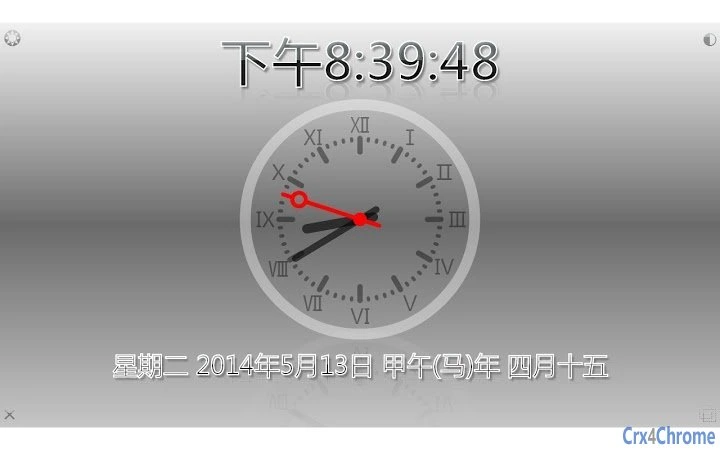
Description
Download zzllrr Clock – Chrome Apps, Clock, Timer, Alarm, Countdown
Overview
The zzllrr Clock is a lightweight desktop application designed to deliver essential timekeeping functions through a customizable, full-screen interface. Built as a Chrome App using HTML5 technology, it operates independently of internet connectivity, making it ideal for users who need reliable access to time tools without relying on network services. The software supports multiple time displays, including digital and analog clocks, and includes features such as alarm clock, timer, and countdown functionality—each accessible through a clean, intuitive layout.
Targeted primarily at individuals seeking a simple yet functional desktop utility, the app suits professionals, students, and home users who value minimalism and efficiency. It can be used in various real-world scenarios, such as tracking study sessions, managing work breaks, or monitoring cooking times. The inclusion of a Chinese lunar calendar adds cultural relevance for users who reference traditional dates in their daily planning. The developer, zzllrr, has focused on creating a tool that is both accessible and adaptable, with an emphasis on user customization and offline functionality.
Key Features & Capabilities
- Full-Screen Display: The app runs in full-screen mode, offering an immersive experience ideal for monitoring time without distractions.
- Multiple Time Views: Users can toggle between digital and analog clock displays, with customizable dials, marks, and color schemes.
- Alarm Clock: A built-in alarm feature allows users to set reminders or wake-up alerts, enhancing productivity and routine management.
- Timer & Countdown: Both timer and countdown functions are available for task-based scheduling, such as Pomodoro sessions or event countdowns.
- Customization Options: Adjust colors, opacity, and zoom levels to suit personal preferences or ambient lighting conditions.
- Offline Operation: Fully functional without an internet connection, ensuring reliability in any environment.
- Chinese Lunar Calendar Support: Displays lunar calendar information, useful for cultural or traditional date tracking.
- HTML5-Based Design: Leverages modern web standards for simplicity, portability, and compatibility across platforms.
These features collectively enable users to tailor the app to their specific needs, whether for daily timekeeping, focused work sessions, or cultural reference. The ability to create a desktop shortcut simplifies access, while the lightweight nature of the application ensures it does not burden system resources.
User Interface, Workflow & Performance
The user interface of zzllrr Clock is minimalistic and centered around functionality. The full-screen layout emphasizes the clock display, reducing visual clutter and enabling quick time recognition. Navigation is straightforward, relying on direct interaction with the display or accessible menus within the app. Users can adjust settings such as colors, opacity, and zoom levels through intuitive controls, allowing for personalization without complex configuration.
Workflow efficiency is enhanced by the app’s ability to launch quickly via a desktop shortcut, making it ideal for immediate use during tasks or breaks. The app maintains a consistent state across sessions, preserving user preferences and settings. Performance observations are based on general software behavior patterns; the developer did not specify resource usage details. However, given its small file size of 2.4 MB and HTML5 foundation, it is expected to operate smoothly on modern systems with minimal impact on CPU or RAM.
Stability appears to be a priority, as the app functions offline and maintains functionality across different environments. No reported crashes or errors were noted in the available information.
Compatibility & System Requirements
zzllrr Clock is compatible with Windows, Mac, and Linux operating systems, offering broad accessibility across major desktop platforms. It is designed as a Chrome App, meaning it runs within the Chrome browser environment, though it can be launched as a standalone desktop application via a shortcut. The installation size is 2.4 MB, indicating a lightweight footprint that requires minimal disk space.
Exact system requirements were not listed. The developer did not provide additional system requirements. Compatibility information is limited to the operating systems mentioned. Users are advised to ensure their system supports Chrome Apps, which may vary depending on the version of Chrome installed. For optimal performance, it is recommended to use a system with up-to-date browser support and sufficient graphical capabilities for rendering the full-screen interface.
Pros and Cons
Pros
- Lightweight and fast-loading with a small 2.4 MB file size
- Full-screen mode enhances visibility and focus
- Supports multiple time formats: digital, analog, and lunar calendar
- Offline functionality ensures reliability without internet access
- Highly customizable with color, opacity, and zoom controls
- Simple, intuitive interface suitable for all user levels
- Available on Windows, Mac, and Linux for cross-platform use
- Free to download and use with optional donation support
Cons
- Requires Chrome browser environment to run, limiting standalone use
- Exact system requirements were not specified
- Customization options may be limited compared to advanced time management tools
- No built-in synchronization with cloud calendars or devices
- Dependent on Chrome App support, which may be phased out in future browser updates
FAQ Section
Is zzllrr Clock compatible with my operating system?
Yes, the app is compatible with Windows, Mac, and Linux systems. It operates as a Chrome App, so you must have Chrome installed to use it.
Can I use this app without an internet connection?
Yes, zzllrr Clock works fully offline. Once installed, it does not require internet access to function.
How do I install and launch the app?
You can install it from the Chrome Web Store. After installation, right-click the app icon on the Chrome Apps page to create a desktop shortcut for quick access.
Is the app free to use?
Yes, zzllrr Clock is free to download and use. The developer appreciates donations as a form of support.
Does the app support the Chinese lunar calendar?
Yes, the app includes support for the Chinese lunar calendar, which can be viewed alongside the standard Gregorian calendar.
Final Thoughts + CTA
zzllrr Clock stands out as a focused, reliable utility for users who need a simple yet powerful timekeeping solution. Its full-screen design, offline capability, and customization options make it a strong choice for productivity-focused individuals and those who value clean, distraction-free interfaces. The inclusion of an alarm, timer, and countdown function adds practical value beyond basic time display.
While its dependency on the Chrome App environment may pose limitations for some users, the app’s lightweight nature, cross-platform availability, and free access make it a compelling option. It is especially beneficial for those seeking a minimal, customizable clock tool without the overhead of complex software.
Download zzllrr Clock now and transform your desktop into a personalized timekeeping hub.
Guides & Tutorials for zzllrr Fullscreen Clock-ZFC App for Chrome
How to install zzllrr Fullscreen Clock-ZFC App for Chrome
- Click the Preview / Download button above.
- Once redirected, accept the terms and click Install.
- Wait for the zzllrr Fullscreen Clock-ZFC App for Chrome download to finish on your device.
How to use zzllrr Fullscreen Clock-ZFC App for Chrome
This software is primarily used for its core features described above. Open the app after installation to explore its capabilities.
User Reviews for zzllrr Fullscreen Clock-ZFC App for Chrome 0
No reviews found





